Human approval on sensitive actions
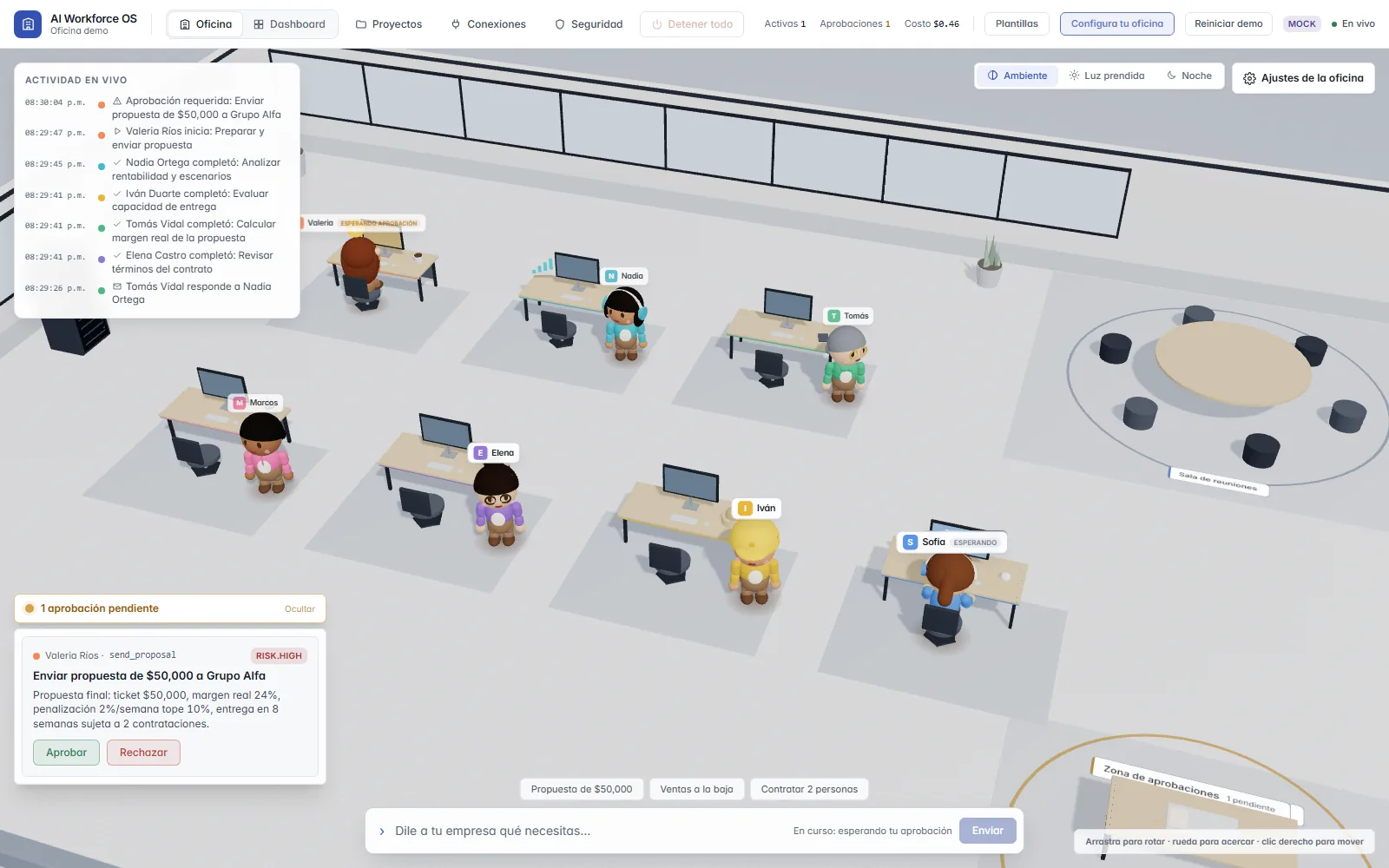
Sending a proposal or a contract requires your decision. Agents can ask for approval; they can never give it. And you choose how much autonomy each employee has.
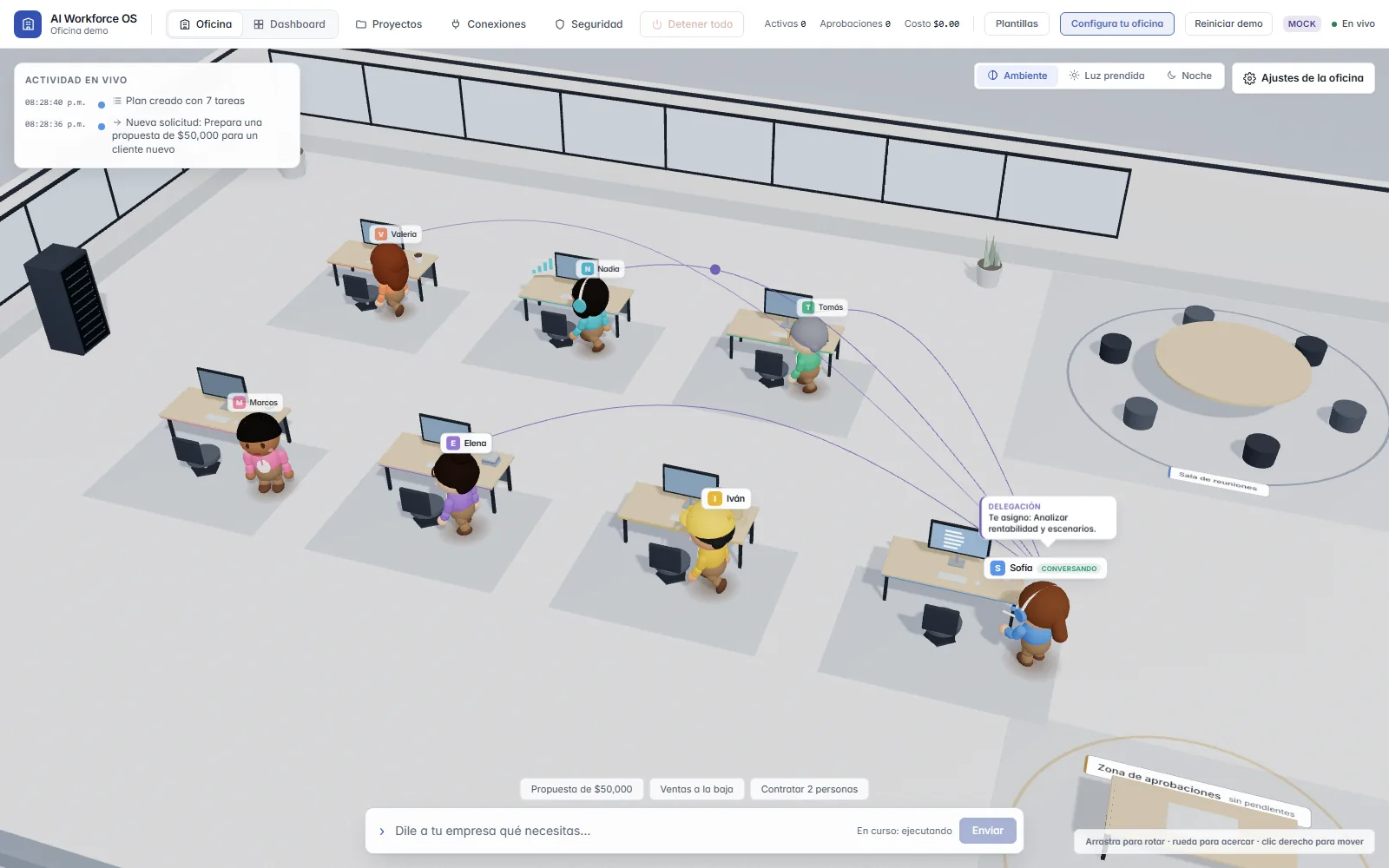
Ask Sales, Legal, Accounting, Analysis, Operations, HR and your Assistant for work in plain language. Watch them split it up in a 3D office, approve what is sensitive and get a report of what was done and what it cost.
Already have an account? Sign in
Start free, no card needed. Pro is 29 USD a month and Max 99 USD; pay yearly and get two months free.
What ships today
The problem
You hand over a task and get a result back. What happened in between stays in a black box.
A message history does not tell you who touched what, or what was sent outside.
The cost shows up later, on an invoice, when you can no longer decide anything.
If you cannot see the process or who they consulted, reviewing the result is guesswork.
AI Workforce OS starts from the opposite premise: everything an AI employee does is visible, has a spending cap and stops to wait for you when it matters.
How it works
You write what you need. The Assistant builds the plan, the team works in parallel, you approve what is sensitive and you get the result.
In plain language, as you would ask a colleague. Before it runs you see a cost estimate.
The Assistant splits the work into tasks with dependencies and hands them out.
Whatever does not depend on something else runs at the same time, and they consult each other.
Before anything goes out, the employee stops and asks for your go-ahead.
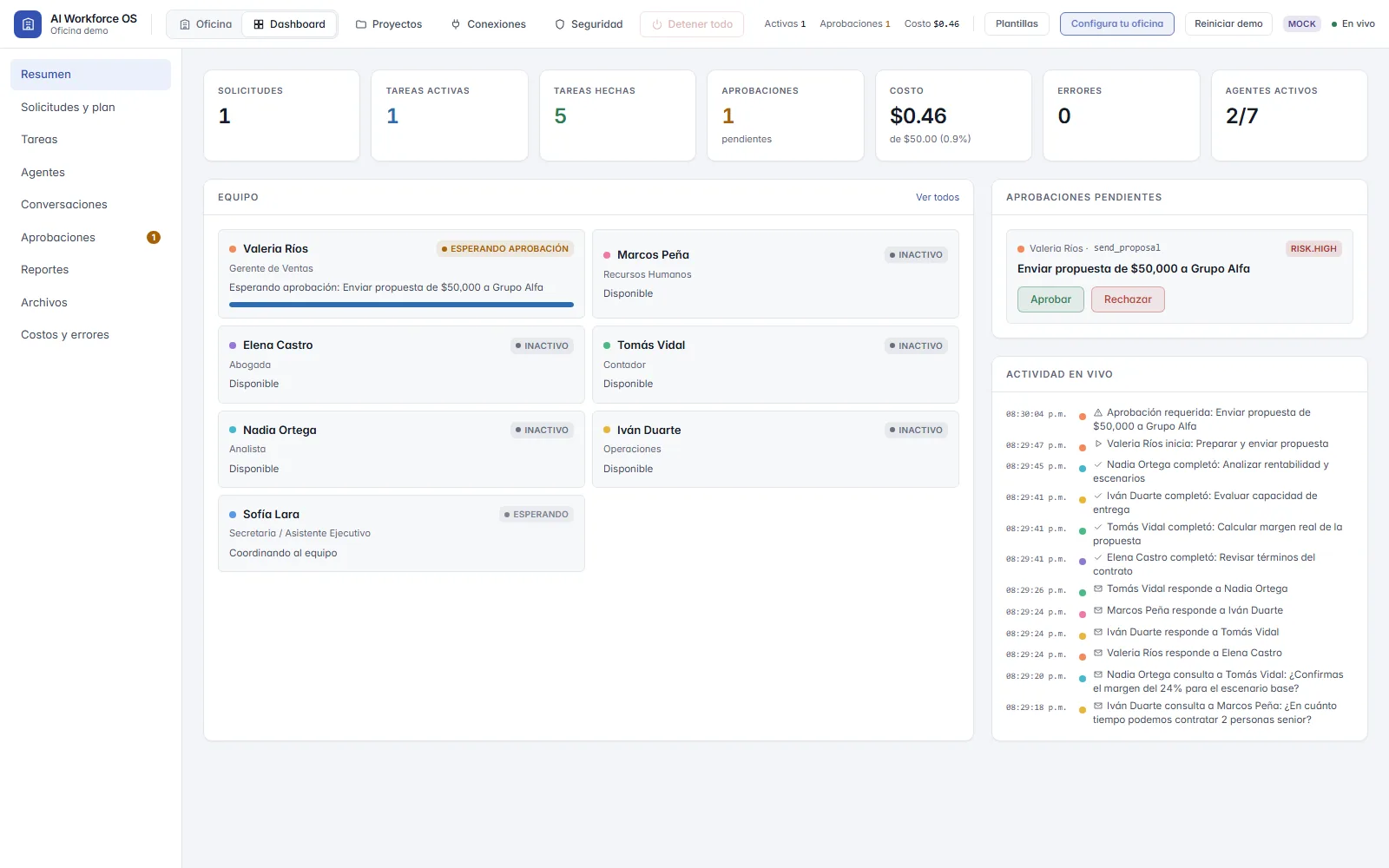
What was done, who took part and what it cost, in one place.
The real app
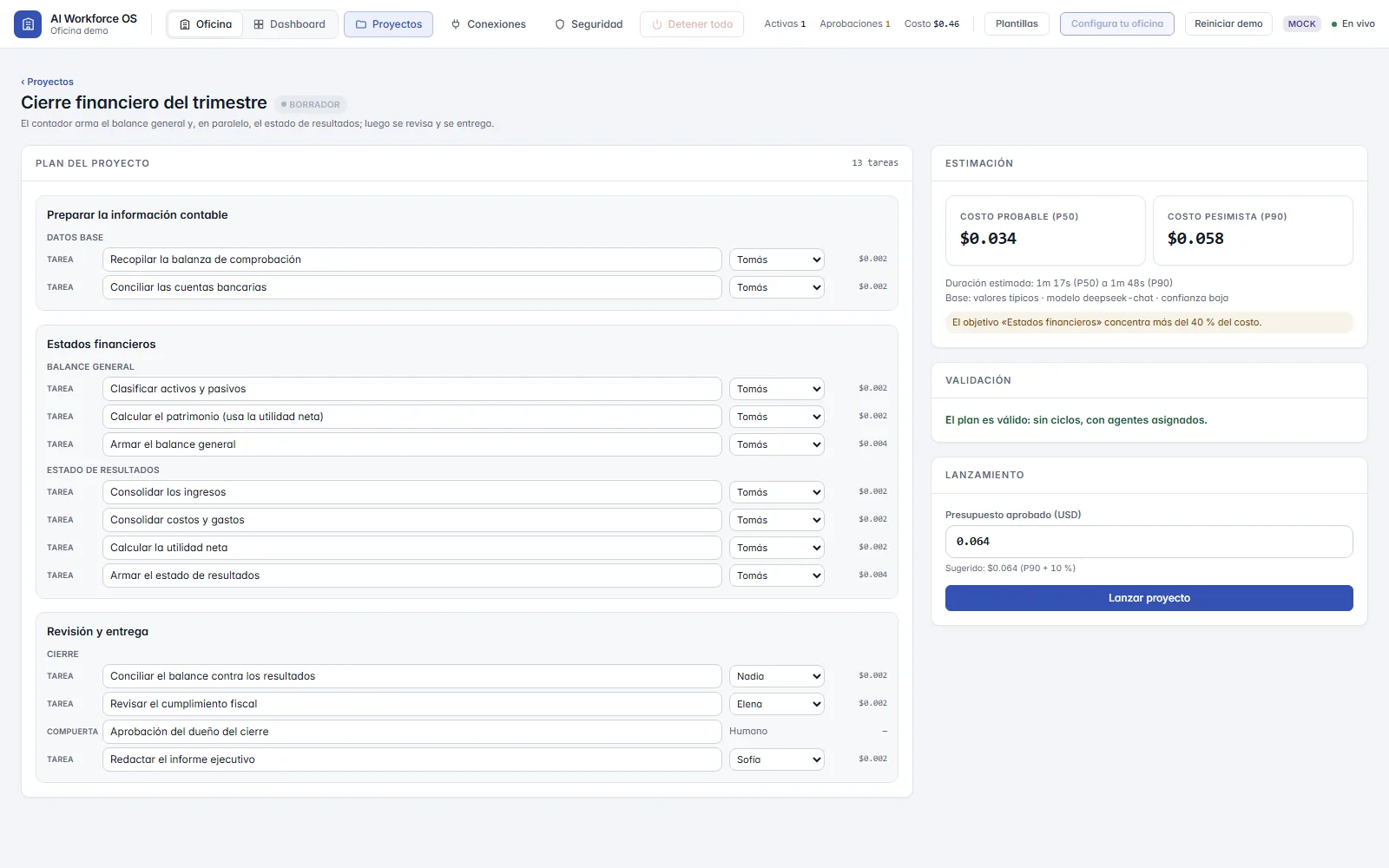
What you see on screen comes from real system events. These screenshots are from simulation mode.
Control
These capabilities exist in the app's code today. Anything that depends on real integrations is listed under “Current status”.
Sending a proposal or a contract requires your decision. Agents can ask for approval; they can never give it. And you choose how much autonomy each employee has.
You see an estimated range before anything runs. There are caps per request, per employee and per organization; when a request or employee cap is hit, the work pauses and you decide whether it continues.
Freeze all activity or put the office in read-only mode. You can also pause a single employee or switch off a specific tool.
Every relevant action goes into a hash-chained log the app can only append to, never edit or delete. It can be exported and verified.
Keys live in an encrypted vault (AES-256-GCM). The AI model never sees them: the backend runs the tools.
A project is split into tasks with dependencies; whatever does not depend on something else runs at the same time.
See the exampleFive workflow templates and four packs (agency, commerce, professional services and general) that set rules and autonomy.
Interface and employees in Spanish (and English), with a configurable regional tone. Ships sample tax templates for Mexico and Spain, labeled as examples.
Parallel work
Example: the quarterly financial close, as in the Projects screenshot. The Accountant does not finish one thing before starting the other.
The team
When you sign up you pick what you do and start with the employees of that job plus an assistant. Each one has a role, tools, memory and a history of what it did, and you can hire other professions when you need them.
Sofía Lara
Plans, coordinates the team and consolidates the final report.
Valeria Ríos
Analyzes the client and prepares proposals.
Elena Castro
Reviews contracts and flags risks.
Tomás Vidal
Calculates margins and builds financial statements.
Nadia Ortega
Assesses profitability and draws findings from data.
Iván Duarte
Checks capacity, deliveries and staffing needs.
Marcos Peña
Prepares hiring processes and role profiles.
Professions described as configuration, each with its risk level and approvals:
Employees prepare and organize. They do not give legal, tax or medical advice: those decisions belong to a human professional.
Security
Design principles you can check in the technical docs. They are not certifications.
Current status
We update it when something changes. Last reviewed in October 2026.
End to end in simulation mode: scripted, realistic responses, no AI key and no cost.
OpenAI, Claude, Kimi, DeepSeek or a compatible endpoint. It works, but we have tested it less than the simulation.
Email sign-up, a 24-hour trial account and invitations with roles (owner, admin, member, viewer).
Requests in progress and pending approvals resume on startup, with a single server instance.
A generic API source the agents can query, data inboxes (a URL with a token that any software can send JSON, CSV or files to) and import from a link (CSV, JSON or Excel, once or on a schedule). No integrations tied to one product in this version.
Implemented in the code; not yet validated with customers.
Free, Pro (29 USD a month) and Max (99 USD a month), paid through ONVO Pay. Tested in test mode; no real charges yet.
Designed on paper. They do not exist today.
Pending. SSO is OIDC only today and recovery assumes a single server.
Getting started
Create your account and within five minutes you will have asked for something, watched the team work and approved your first action.
Type what you need in the office bar, the way you would ask a team lead. There are shortcuts to try.
Your AI employees split the work and you see it happen live: who does what, what it costs and how far along it is.
Anything sensitive stops and waits for your decision. You approve or reject from the tray; nothing important leaves without you.
You get a report, and every finished task earns coins to dress your team and decorate the office.
FAQ
That is up to you. Without a key it runs in simulation mode, with scripted results and no cost. With your own OpenAI, Claude, Kimi or DeepSeek key it uses a real model; that path works, but we have tested it less than the simulation.
Not in this version. The agents prepare drafts and documents that you review and send. Connectors for specific products (Gmail, Google Calendar and Drive, Slack, LinkedIn, GitHub) exist in the code, but they are switched off in v1 and have not been tested with real accounts; they are turned on on request. WhatsApp is not built.
Keys go into an encrypted vault and the model does not see them. With real AI, task text is sent to the model provider you configure; check its terms before using sensitive data.
No. An agent can ask for approval, but the decision is always a person's. You adjust what requires approval and how much autonomy each employee has.
That is not the idea. It is a support team that prepares, organizes and consults; important decisions stay yours. It does not replace a lawyer, an accountant or any other professional.
A throwaway trial account, with its own office, that stops working after 24 hours. It asks for no email: the username and password are shown once.
There is a Free plan to try it for real, no card needed: 1 USD of AI a month, 1 active project and 2 people. Pro is 29 USD a month (12 USD of AI, 5 projects, 10 people, 10 GB) and Max 99 USD a month (45 USD of AI, 20 projects, 50 people, 50 GB). Pay yearly and get two months free. The AI never spends past your plan's cap.
Not yet. OIDC single sign-on, SCIM and restart recovery exist, but we hold no certifications, there is no SAML and it has not been validated with large companies. Today it is aimed at small teams and Spanish-speaking professionals.
Create your account with your email and your company name: you land in your own office, separate from everyone else's. You start on the Free plan, no card needed. This page collects no data: signing up happens in the app.